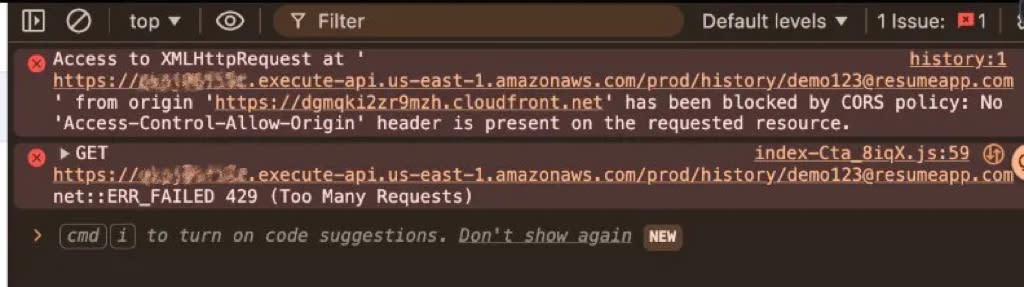
Happy Saturday! Or at least it was supposed to be. Two hours ago I cracked open ResumeMatch to check something quick and walked straight into a blank page and a wall of red errors. Not exactly how I planned to spend my morning.
The History page and Cost Dashboard, both of which fetch data from the API on load, were completely broken. The browser console showed two errors stacked on top of each other: a CORS block and a 429 Too Many Requests. No data loaded.
What followed was a debugging session that touched API Gateway architecture, CORS at the infrastructure level, usage plan quotas, and frontend polling logic. This is the kind of production debugging that doesn't show up in tutorials but happens constantly in real systems.
The Symptoms
The first clue that something deeper was going on: there were no errors in the Lambda CloudWatch logs. If Lambda isn't logging the request, it never received it. The rejection was happening upstream.
Root Cause 1: Gateway-Level CORS
This is the part most people miss when setting up CORS on API Gateway. There are two places a response can originate:
- Your Lambda function — where you probably already set CORS headers in the response object.
- API Gateway itself — when it rejects a request before it ever reaches Lambda (throttling, auth failures, bad request format, etc.).
My Lambda was returning proper CORS headers. But when API Gateway returned a 429 on its own from its built-in throttling, that response had zero CORS headers. The browser saw no Access-Control-Allow-Origin, blocked the response entirely, and surfaced the CORS error, which masked the real 429 underneath.
The fix was in the Gateway Responses section of the API Gateway console. Every response type (Access Denied, Throttled, Integration Failure, etc.) had "none" for response headers. I added CORS headers to both Default 4XX and Default 5XX:
Access-Control-Allow-Origin:  'https://your-cloudfront-domain.cloudfront.net'
Access-Control-Allow-Headers: 'Content-Type,Authorization'
Access-Control-Allow-Methods: 'GET,POST,OPTIONS'
Note the single quotes. API Gateway requires static header values to be wrapped in single quotes. Miss that and it silently fails.
After saving, the critical step: redeploy to the prod stage. Gateway Response changes don't take effect until you redeploy. This is easy to forget and will leave you wondering why nothing changed.
Root Cause 2: Usage Plan Quota
With the CORS fix in place, the browser could finally read the 429 response. Now I needed to figure out why the API was throttling in the first place.
The API Gateway stage had generous rate and burst limits. But there was a Usage Plan attached with a monthly quota that was far too low for an app with polling behavior.
Let's do the math. The Results page polls for analysis status every few seconds. A single resume analysis takes about 36 seconds of backend processing, which means roughly 12 polling requests per analysis. Add the upload request and S3 presigned URL request, and a single analysis burns around 14 API requests. With a low monthly quota, that gets exhausted after just a few dozen analyses. For a demo app that I'm actively developing and testing, that goes fast.
The immediate fix was to increase the quota significantly. After doing the math on expected usage (my own testing plus demo traffic), I set a number that gives comfortable headroom without removing the safety net entirely.
Hardening the Polling Logic
While investigating the 429, I looked at the frontend polling behavior and found two edge cases that could waste quota or cause runaway requests.
Fix 1: Stop on all terminal states
The polling hook checked for completed and failed to stop polling. But if the backend ever returned an unexpected status like error or cancelled, polling would continue indefinitely.
The fix was to invert the logic: instead of stopping on known terminal states, only continue on known in-progress states.
// Before: stop if terminal (misses unexpected statuses)
if (data.status === 'completed' || data.status === 'failed') {
  clearInterval(timerRef.current);
}

// After: continue only if in-progress
if (data.status !== 'pending' && data.status !== 'processing') {
  clearInterval(timerRef.current);
}
I extracted this into a helper function to keep the logic DRY across the initial fetch and the polling callback:
function isInProgress(status: string) {
  return status === 'pending' || status === 'processing';
}
Fix 2: Max poll timeout
Even with the terminal state fix, there's a scenario where the backend genuinely gets stuck in processing forever. Maybe the Bedrock call hangs or Lambda times out silently. Without a hard cap, the frontend would poll indefinitely.
I added a 2-minute setTimeout that fires only when polling starts. On timeout, it clears the polling interval and sets timedOut = true. The hook returns this flag so the UI can replace the spinner with an actionable message:
const POLL_TIMEOUT_MS = 120_000; // 2 minutes

// Inside useEffect, after polling starts:
timeoutRef.current = setTimeout(() => {
  clearInterval(timerRef.current);
  setTimedOut(true);
}, POLL_TIMEOUT_MS);
The Results page checks timedOut and shows "Still processing, refresh to check status" instead of an infinite spinner. Both the timeout and interval are cleaned up on unmount.
What About Exponential Backoff?
I considered adding exponential backoff to the polling interval (2s, then 4s, then 8s, capped at some ceiling). But running the numbers, it would only save 3 to 4 requests per analysis. Against the current quota, that's negligible.
The two fixes above cover the dangerous cases: runaway polling from unexpected states and a hard time cap. Exponential backoff is an optimization worth revisiting if the user base grows or more polling-heavy features are added. For now, it's complexity without meaningful benefit.
Lessons Learned
CORS errors often mask the real problem. When the browser can't read the response due to missing CORS headers, the actual HTTP status code gets hidden. Always check if your API Gateway returns CORS headers on error responses, not just successful ones.
Gateway Responses are a separate CORS surface. Configuring CORS in your Lambda response headers is not enough. Any response that API Gateway generates before reaching your Lambda (throttling, authorization failures, validation errors) needs its own CORS configuration.
Usage plan quotas are easy to overlook. Stage-level throttling (rate/burst) gets all the attention, but the monthly quota on a usage plan is what actually caps your total throughput. If you have a polling-based frontend, do the math on how many requests a single user session generates.
Whitelist in-progress states, don't blacklist terminal ones. Checking status !== 'pending' && status !== 'processing' is safer than status === 'completed' || status === 'failed' because any unexpected status value stops polling by default instead of letting it run forever.
Not every optimization is worth doing right now. Exponential backoff sounds good in theory, but when the math shows minimal savings against a comfortable quota, ship the safety fixes and move on.
Back to the Saturday I was promised. Until next time.